The 7 Wild Gadgets You Can Build With Meta's Free Muse Code in 2026 (Your Dusty Raspberry Pi Finally Has a Job)
Meta just open-sourced the SDK to run Muse on cheap hardware. Generous? Sure. Selfless? Let's talk.
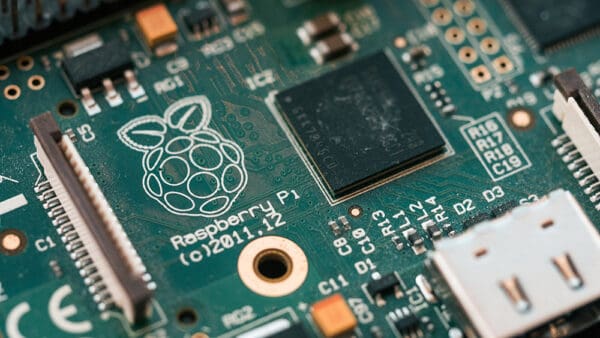 Photo: Harrison Broadbent via Unsplash. This exact kind of dusty board is now a Muse gadget waiting to happen.
Let's stop pretending Meta's hardware strategy is complicated. It has exactly one move: give away the razor, monetize everything the razor touches.
On October 2, Meta open-sourced the code to run Muse, its personal AI agent, on ESP32 boards and Raspberry Pis. Free. Mostly Apache 2.0.
This article is not a product announcement. It is about why the most interesting AI hardware move of the year ships with a warning that says proceed at your own risk.
1. What Meta actually released
- Muse Gadgets: open-source firmware for ESP32 microchips, plus a Linux Device SDK for the Raspberry Pi and other Linux boxes.
- Meta's own words: "Muse gadgets are open source devices you build yourself. Program an off-the-shelf ESP32 board or set up a Raspberry Pi with our SDKs."
- Most of it sits under the Apache 2.0 license. Some third-party components keep their own licenses.
So what: the agent that normally runs on Meta's Secure VM can now legally live on your workbench. That is the headline.
(Source: Machine Brief, via The Verge, Oct 2, 2026)
2. What Meta suggests you build first
- A color E Ink display that shows your reminders
- An HDMI stick that puts Muse on your big screen
- A small touchscreen device, basically a DIY Muse Charm
Meta led with the cute examples, not the powerful ones. Classic.
So what: the examples are toys, but the hardware surface is enormous. Displays, buttons, sensors, actuators, mics, speakers.
(Source: Machine Brief, via The Verge)
3. The serious one: your Linux box becomes an agent
- The Linux Device SDK turns a spare Raspberry Pi or Linux box into a Muse gadget with custom commands.
- Custom commands can handle things like sysadmin tasks or Home Assistant controls.
- This is not a chatbot in a box. This is an agent with hands.
So what: this is the bridge between a cloud agent and your physical stuff. That is the real story.
(Source: NERDS.xyz)
4. What you actually need to start
- An SDK token for pairing your gadget
- Developer mode enabled in the Muse app on iOS or Android
- Your hardware shows up as a MuseGadget device
- ESP32 support means screens, microphones, speakers, and sensors without a full Linux computer behind them
So what: the entry ticket is a $10 microcontroller and a phone app. Not a $2,000 dev kit.
(Source: NERDS.xyz)
5. The 5,000 free Home Links
- Meta manufactured 5,000 Muse Home Link gadgets, per Meta Superintelligence Labs' Nat Friedman (per reporting).
- A waitlist is open now, with shipping expected sometime this month.
- It runs community-built skills: turn on a light, control your TV, send a document to a printer, depending on your setup.
So what: Meta is seeding 5,000 developers as evangelists. Oldest platform playbook in the book, and it works.
(Source: DigitalTrends)
6. "By hackers, for hackers, just for fun"
- Meta's own description of the project. It even jokes about bricked boards, voided warranties, brownouts, and bankruptcies.
- Meta shipped documentation specifically for coding agents, so you can use AI to help build the physical hardware your AI runs on. Yes, really.
- Meta just admitted the real platform is the tinkerer, not the consumer.
So what: the consumer polish is someone else's problem. Meta wants the ecosystem, not the warranty claims.
(Source: NERDS.xyz)
7. The part nobody is tweeting about
- The SDK is open. The data pipeline behind the agent is not.
- This is my standing complaint, and it applies double here: the code on your workbench is yours, but a gadget that sits in your home, hears your voice, and wires into your sensors is a data firehose pointed at someone else's servers.
- The Apache 2.0 license covers the code. It does not cover your conversations.
- Free tools are marketing budgets in disguise. The price of this one is the telemetry of your house.
So what: read the privacy terms before you flash the firmware. Open source and open data are different things.
(Source: DigitalTrends)
How to start
The tinkerer with a dusty Pi: install the Linux Device SDK, flip on developer mode in the Muse app, grab your SDK token, and give it one custom command. Something small. A morning briefing on an E Ink screen.
The ESP32 person: flash the firmware, wire up a screen and a mic, and let it read you your reminders. You will break one board. That is the tuition.
The cautious one: build it, but run it on a network you control and actually read what the app sends back. Fun does not require naivety.
The builder: start with the coding-agent docs Meta shipped. Let AI scaffold the gadget code, then review every line like it owes you money.
The real pattern
Every platform company eventually learns the same trick: you don't need to sell the hardware if you can be the voice inside everyone else's.
Final thoughts
Meta giving away the SDK is the most generous and the most strategic move of the week. Both can be true.
Build the gadget, read the terms, keep your eyes open.
Yes, AI helped write this. It did the typing. I gave the ideas and I did the editing and orchestrating.
If this saved you money or taught you something, buy me a coffee. It keeps the articles coming.
Follow along. Clap if it earned it.